Crafting Realistic Gerbera Paper Flowers with Digital Templates
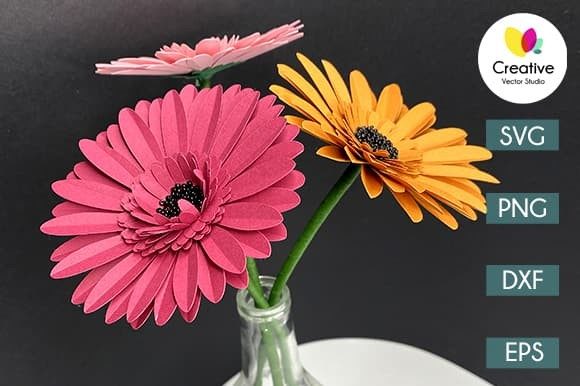
There is a distinct satisfaction in holding a flower that never wilts, especially when you have crafted it yourself. The Gerbera paper flower has become a favorite among crafters for its bold colors and intricate petal layers that mimic nature with surprising accuracy. Unlike simpler floral designs, the Gerbera requires precision to capture its signature radiating petals and textured center. This is where digital templates transform a potentially daunting project into an accessible and enjoyable creative session. Whether you are looking to decorate a wedding venue, create a unique gift, or simply enjoy a relaxing afternoon of making, having the right files makes all the difference.
When you access a high-quality digital design package for these flowers, you are not just getting an image; you are getting a toolkit. A comprehensive download typically includes a single ZIP file containing multiple formats: SVG, DXF, EPS, and PNG. It is crucial to remember that these files are compressed, so you must extract them from the folder before attempting to use them in your software. Once unpacked, you will find one SVG file, eight PNG images at 300 dpi with transparent backgrounds, one EPS vector file, and one DXF file. This variety ensures that regardless of your preferred tool or skill level, you have the correct format to begin creating immediately.
Why Different Creators Choose Paper Florals
The appeal of the Gerbera paper flower extends far beyond a single type of hobbyist. Different people approach this craft with different goals, and the availability of versatile file formats caters to this wide spectrum.
For beginners, the primary concern is often ease of use and the fear of ruining expensive materials. Hand-cutting a complex flower like a Gerbera can be time-consuming and requires a steady hand. However, with a pre-made template, a novice can focus on the assembly and coloring rather than struggling to draw perfect symmetry. The included PNG files are particularly helpful here; they serve as visual guides or stencils if one prefers to trace by hand before cutting. The realistic look of the final product provides a confidence boost, proving that professional-looking results are achievable without years of practice.
Experienced crafters and owners of electronic cutting machines, such as Cricut or Silhouette, prioritize speed and consistency. If you are producing decorations for an event or building a large installation, cutting twenty flowers by hand is impractical. The SVG file is the workhorse for this group. Compatible with Cricut Design Space, Silhouette Designer Edition, and Brother Scan and Cut software, the SVG allows the machine to read the precise paths for every petal and leaf. This ensures that every flower in a bouquet is identical in size and shape, maintaining a polished, uniform aesthetic that is difficult to achieve manually.
Technical Flexibility for Various Tools
One of the most practical aspects of a multi-format download is the ability to adapt to the software and hardware you already own. Not everyone has the latest subscription-based design software, and a good template respects that reality.
- SVG Users: Ideal for those with Designer Editions of cutting software. These files retain vector data, meaning you can resize the Gerbera flower to be six inches or sixty inches without losing any quality or sharpness.
- DXF Users: If you are using the basic, free version of Silhouette Studio, the included DXF file is your gateway. It functions similarly to the SVG within that specific ecosystem, allowing basic cutting operations without needing an upgraded software license.
- Vector Editors: Graphic designers who prefer Adobe Illustrator or CorelDraw will find the EPS file indispensable. This format allows for deep customization. You might want to alter the curve of a petal, add custom cut-lines for scoring, or integrate the flower into a larger branding layout. The EPS file gives you full control over the vector nodes.
- Raster Users: The eight PNG files included are high-resolution (300 dpi) with transparent backgrounds. These are perfect for digital invitations, sublimation projects, or printing directly onto cardstock if you do not own a cutting machine. They are ready to use in word processors or photo editing apps without needing to remove a white background manually.
Evaluating Value: Cost, Quality, and Long-Term Use
When deciding whether a digital template fits your needs, it helps to evaluate what you value most in a project. For some, cost efficiency is the driver. Buying a physical paper flower can be expensive, and shipping large arrangements is risky due to damage. Creating them yourself using a digital download significantly reduces the cost per unit, especially when buying cardstock in bulk.
For educators and workshop leaders, the value lies in the learning experience. Teaching a class on paper crafting requires reliable materials. A template that cuts cleanly and assembles logically ensures that students spend their time learning techniques rather than troubleshooting broken cuts. The realistic appearance of the Gerbera also serves as an excellent example of how layering and shading can create depth in paper art.
Small business owners and entrepreneurs often look at the commercial potential. A high-quality template allows for the creation of sellable goods, from home decor to party favors. The flexibility to resize the design means you can offer small boutonnieres and large wall art using the same base file. However, it is important to check the specific licensing terms of the download to ensure commercial use is permitted. The clean nature of these files—free of watermarks, photos, or extraneous backgrounds—means the final product looks entirely handmade and professional, increasing its market value.
From File to Finished Flower
The journey from a digital download to a tangible object involves a few straightforward steps. First, purchase and download the ZIP file. Locate the file on your computer and extract its contents. You will now see the individual SVG, DXF, EPS, and PNG files ready for import.
If you are using a cutting machine, upload the SVG or DXF to your software. Arrange the pieces on your virtual mat to maximize cardstock usage. Select your material settings—usually "cardstock" or "heavy cardstock" works best for structural petals—and let the machine do the work. If you are hand-cutting, print the PNG or EPS file onto your chosen paper and use a sharp pair of scissors or a craft knife.
Assembly is where the magic happens. The Gerbera typically involves layering petals from largest to smallest, curling the edges slightly to give them dimension, and attaching them to a central disk. Because the template is designed with realism in mind, the petal shapes are engineered to overlap naturally, creating that full, blooming look without requiring complex folding techniques.
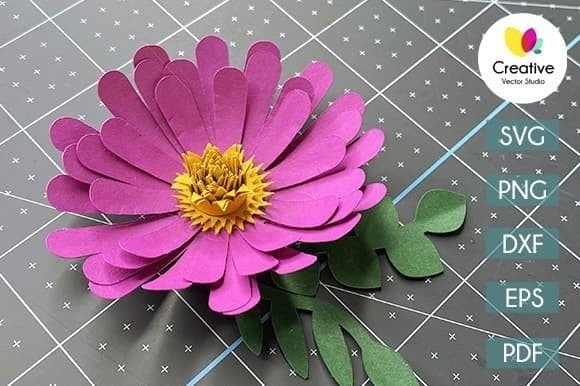
It is worth noting that while the photographs you see in product listings are stunning examples of what is possible, the download itself contains only the digital files. No physical flowers or printed papers will be shipped to you. This distinction is vital for managing expectations; you are purchasing the blueprint, not the building. The quality of your final result will depend on the paper you choose, the precision of your cut, and the care you take in assembly.
Ultimately, the Gerbera paper flower template is a bridge between digital convenience and tactile creativity. It removes the barrier of needing advanced drawing skills while leaving ample room for personal expression through color choice and paper texture. Whether you are a busy parent looking for a weekend activity, a designer needing a specific graphic element, or a crafter building a legacy piece for a special occasion, these files provide the foundation you need to create something beautiful and lasting.