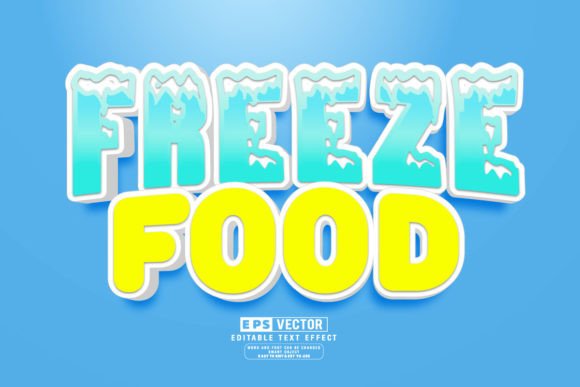
Evaluating the Freeze Food 3D Editable Text Effect for Design Projects
In the competitive landscape of graphic design, particularly within the food and beverage industry, visual appeal is paramount. Designers and marketers constantly seek assets that can convey texture, temperature, and appetite appeal instantly. The Freeze Food 3D Editable Text Effect has emerged as a specialized resource for professionals looking to achieve a frosty, chilled aesthetic without starting from scratch. This asset, often distributed as a vector file compatible with Adobe Illustrator, offers a specific set of capabilities designed to streamline the creation of winter-themed branding, frozen product packaging, and seasonal promotions.
Understanding the utility of this tool requires looking beyond the surface-level visuals. It is not merely a pre-made image but a functional template that balances artistic complexity with editing flexibility. For those evaluating whether to incorporate this effect into their workflow, it is essential to understand its mechanics, advantages, limitations, and ideal use cases.
What Is the Freeze Food 3D Editable Text Effect?
At its core, the Freeze Food 3D Editable Text Effect is a digital design template constructed using vector graphics software, primarily Adobe Illustrator. Unlike raster-based effects (pixels) which can lose quality when resized, vector designs rely on mathematical paths, ensuring crisp edges at any scale. This specific effect simulates the appearance of text encased in ice or covered in frost, utilizing gradients, transparency settings, and layered shapes to create depth and a three-dimensional illusion.
The "editable" component is the defining feature. Rather than being a flat JPEG or PNG where the text is baked into the image, this asset utilizes smart objects or layered text fields. This architecture allows the user to replace the placeholder text with their own copy while retaining the complex styling applied to the original design. The inclusion of a large library, such as a collection of 100 editable variations, provides designers with a broad spectrum of stylistic choices ranging from subtle condensation to heavy ice buildup.
Why Designers Choose Frozen Text Effects
The decision to utilize a pre-made frozen text effect usually stems from the need for efficiency and consistency. Creating a realistic ice texture manually involves advanced knowledge of blending modes, mesh tools, and lighting simulation in Illustrator. This process can be time-consuming, often taking hours to perfect a single word. By leveraging a Freeze Food 3D Editable Text Effect Vector, designers can bypass the technical execution phase and focus on layout and composition.
Furthermore, the psychological impact of cold imagery is significant in marketing. For products like ice cream, frozen meals, chilled beverages, or winter sports equipment, the visual cue of frost triggers sensory associations with freshness and low temperature. Using a dedicated text effect ensures that the typography aligns perfectly with the product's value proposition, reinforcing the brand message through visual semantics.
Key Benefits and Functional Advantages
When evaluating this type of asset, several practical benefits stand out for professional users:
- Scalability: Because the design is vector-based, the text effect can be applied to small labels or massive billboards without pixelation or loss of detail.
- Customization: The ability to change words, fonts, and sizes easily means the asset is versatile. A designer can adapt the same frosty style for a headline, a subheader, or a logo mark simply by clicking and editing the text layer.
- Time Efficiency: With access to a wide variety of styles (e.g., 100 editable options), users can rapidly prototype different looks to see which resonates best with their target audience before finalizing a design.
- Non-Destructive Editing: High-quality templates allow for color adjustments and shape modifications without ruining the underlying texture, giving designers control over the final hue of the ice or the intensity of the shadow.
Considerations and Tradeoffs
While the convenience of editable text effects is clear, there are tradeoffs that potential users must consider. The primary limitation lies in the specificity of the style. A heavy freeze effect may look excellent on a bag of frozen peas but could appear incongruous on a warm bakery item or a summer sunscreen advertisement. Overusing such a distinct texture can also lead to visual clutter if not balanced with clean negative space.
Additionally, while these files are marketed as "easy to edit," they still require a baseline proficiency with Adobe Illustrator. Users must understand how to navigate layers, identify clipping masks, and manage font licensing. If a user attempts to edit the file in software that does not fully support Illustrator's advanced vector features, the 3D effect may break or render incorrectly. Therefore, the "click and edit" promise is contingent upon having the correct software environment.
Ideal Use Cases
The Freeze Food 3D Editable Text Effect is a strong fit for specific scenarios where the theme of cold is central to the communication strategy. These include:
- Frozen Food Packaging: Labels for ice cream tubs, frozen dinners, and chilled drinks benefit immensely from typography that visually reinforces the storage temperature of the product.
- Seasonal Campaigns: Winter sales, holiday promotions, and New Year events often utilize cold motifs to evoke the season. This text effect serves as an immediate thematic anchor.
- Beverage Branding: Companies selling sodas, beers, or waters often want to emphasize the "ice-cold" serving suggestion. Applying this effect to logo lockups or promotional banners can enhance the perceived refreshment value.
- Sports and Recreation: Marketing materials for ski resorts, ice skating rinks, or winter gear retailers can use these fonts to create an immersive atmospheric feel.
When to Consider Alternatives
Despite its utility, there are situations where alternatives may be worth considering. If a project requires a highly unique, bespoke artistic direction that deviates from standard ice textures, a custom illustration might be necessary. Pre-made effects, by definition, follow established patterns; if a brand needs to stand out through complete novelty, a hand-drawn approach may be superior.
Moreover, if the final output is strictly for low-resolution web use where vector scalability is irrelevant, a high-quality raster mockup might suffice and could be easier for non-designers to manipulate in simpler photo-editing tools. Additionally, if the budget allows for a dedicated motion graphics project, a 3D rendered animation of freezing text might provide a more engaging user experience than a static vector effect.
Making the Decision
Ultimately, selecting the Freeze Food 3D Editable Text Effect comes down to a balance of speed, budget, and thematic relevance. For agencies and freelancers managing tight deadlines for food and beverage clients, the ability to deploy a professional-grade, scalable, and editable frost effect instantly is a significant strategic advantage. It removes the technical barrier of creating complex textures while ensuring the final output meets print and digital standards.
However, success with this tool depends on thoughtful application. Designers should evaluate whether the frosty aesthetic aligns with the broader brand identity and ensure they have the necessary software skills to leverage the editable features fully. When used judiciously, this vector resource transforms a routine typography task into a compelling visual statement that effectively communicates temperature and freshness to the consumer.